
Tickets & payments
Sell without friction.
Clear categories, a short checkout and the payment methods your attendees actually use.
- Free or paid tickets
- Mobile Money and card
- No attendee account required
Ticketing that fits your event
Sell the way your organisation actually works.
One single entry, six categories or a three-day pass: it's the same tool, set up differently.
General admission
One ticket giving access to the whole event.
Several categories
Standard, Premium, VIP, Press, Student, or any other category you create.
Tiered pricing
Early bird, standard, final phase or time-limited offers.
Multi-day passes
A single pass valid across several days or sessions.
Zones and seats
Organise availability by zone, section or seat when seating is turned on.
Free tickets
Issue tickets without payment while keeping attendees identified and checkable.
What you configure
- 01
Categories and quotas
Standard, VIP, early bird, multi-day passes. Quotas per category and per sales channel.
- 02
Seats and seating
Floor plan, zones, numbering. The attendee sees what is still available.
- 03
Promo codes
Time-limited discounts, by amount or percentage, reserved for a list.
- 04
Short checkout
A few fields, no account to create, no app to install.
- 05
Mobile Money and card
Only the methods actually supported at launch are shown to the attendee, nothing more.
- 06
Refunds
Refund requests and operations follow your event's conditions, and stay traceable in Tikiti Business.
One ticketing setup, several ways to take part
Picture the ticketing of your next event.
Each line has its price, its quota and its channels. The attendee only ever sees what concerns them.
| Category | Price | Availability | Channel |
|---|---|---|---|
| Early bird | $15 | Closed | Online |
| Standard | $25 | 418 left | All channels |
| Premium | $60 | 84 left | Online |
| VIP | $100 | 21 left | By invitation |
| Press | Free | Approval required | Accreditation |
Demo setup. The amounts and quantities are shown as an example.
The attendee's journey
Fewer steps between interest and confirmation.
The attendee picks a category, fills in what is needed, and pays with what they have.
- 1ChooseThey select their ticket or their seat.
- 2IdentifyThey give a name and contact details, without having to create an account.
- 3PayThey pick from the payment methods actually available for your event.
- 4ReceiveOnce confirmed, the ticket is issued with the event details.

The attendee came for your event, not to fill in a long form.
From payment to ticket
A confirmation immediately creates usable access.
Payment isn't an isolated operation: it sets off everything that follows.
- 01Payment confirmed
- 02Ticket generated and tied to the attendee
- 03Ticket received on their phone
- 04Ticket checked at the door
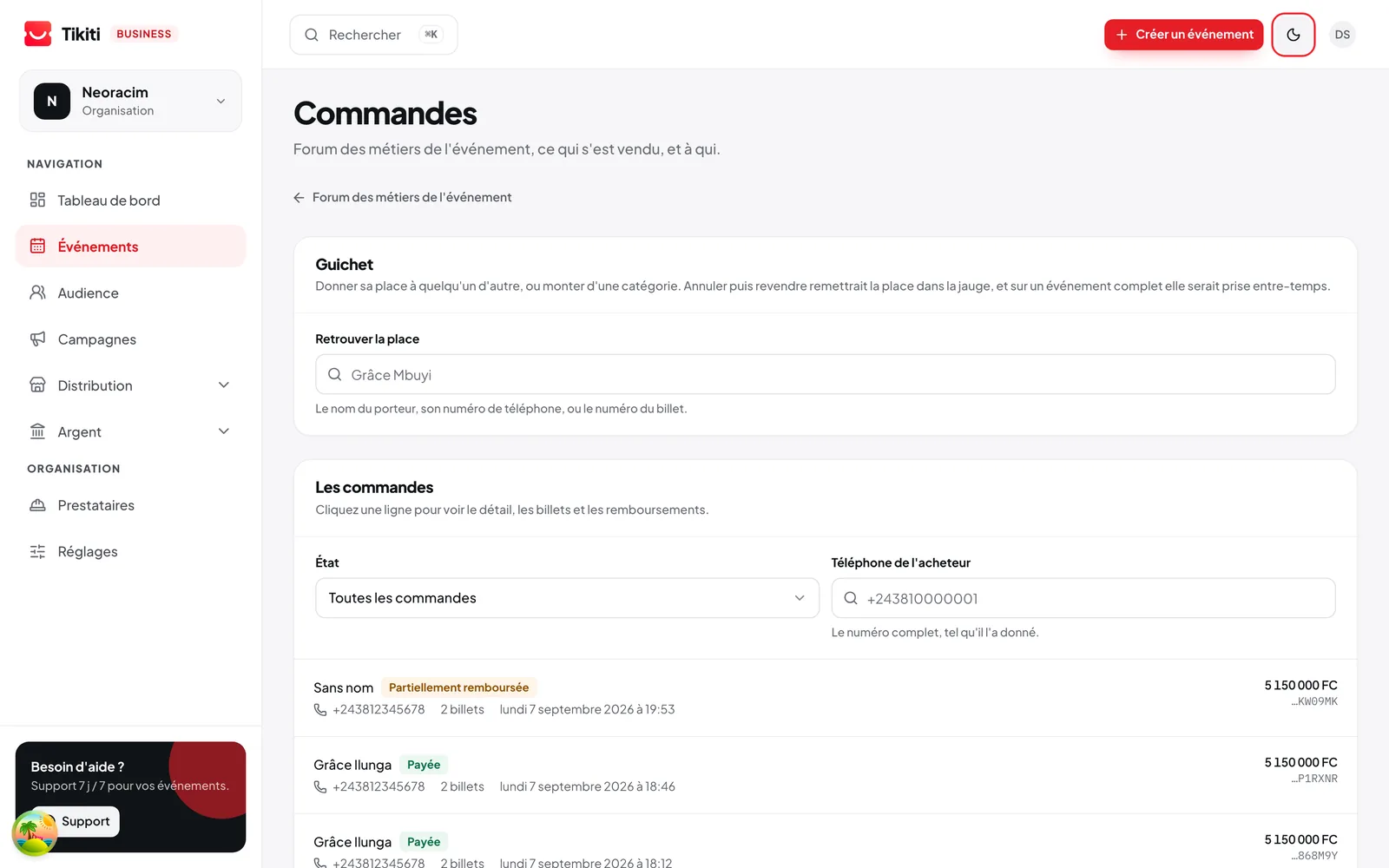
Every payment becomes a traceable operation.
You find the attendee, the ticket concerned and the payment status, with nothing to piece back together.
- Payment pending
- Payment confirmed
- Payment failed
- Ticket issued
- Order cancelled
- Refund requested
- Refund completed
Your ticketing, live
Follow what is happening without waiting for the event to end.
What is left, what is going, and through which channel.
- Tickets issued
- Remaining availability
- Revenue by category
- Orders pending
- Payments confirmed
- Split by payment method
- Performance by channel
- Refunds
Stop discovering after sales close what you could have followed while they were open.
Before
A payment link, a screenshot sent as proof, and a list kept by hand the day before the event.
With Tikiti
Every sale creates a valid pass, tied to an attendee, checkable at the door and visible in your reports.
Frequently asked questions
Which payment methods are offered to the attendee?
Mobile Money and bank card. Only the operators actually active in your market at the time of sale are shown: we never display an unavailable payment method.
Does the attendee have to create an account or install an app?
No. Checkout happens on the web with a phone number as the identifier. The pass arrives by SMS and WhatsApp. The Tikiti app remains an option for those who want all their tickets in one place.
Can I sell numbered seats?
Yes. You import or draw the floor plan, define the zones and the prices per zone. The assigned seat shows on the pass and at the scan.
How do refunds work?
You set the rule when creating the event: refundable until a date, partially, or not at all. Tikiti applies that rule and keeps a record of every movement for your accounting.
What happens if an attendee loses their ticket?
They find it again with their phone number. The previous QR is invalidated and a new one is issued, so a lost ticket never circulates.
Keep reading
For which events
- Concerts & festivalsBring the audience, the sales channels, the teams and the gates into one festival.Discover
- Trade shows & exhibitionsVisitors, exhibitors, stands, badges, sessions and meetings in one show.Discover
- Contests & votingTraceable votes, a defensible ranking and a jury kept separate from the public.Discover